
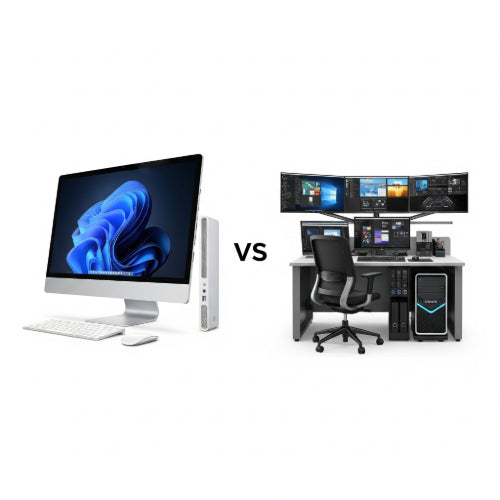
Desktop vs. Workstation: Which Is Right for Your Business Needs?
When outfitting your business with new computers, one of the fundamental decisions you'll face is whether to opt for standard desktop PCs or more powerful workstations. While they might look similar on the outside, what's under the hood and their intended purpose can vary dramatically. Choosing the right one is crucial for productivity, longevity, and overall cost-effectiveness.
Let's break down the key differences between desktops and workstations to help you decide which is best for your business.
Standard Desktop PCs: The Everyday Workhorse
A standard desktop PC is what most people imagine when they think of a computer. It's designed for general-purpose computing and is perfectly adequate for the majority of office tasks.
Best For:
- General Office Tasks: Email, word processing, spreadsheets, presentations, web Browse.
- Customer Service: Call center operations, data entry.
- Administrative Roles: Scheduling, basic record keeping.
- Small Businesses/Startups: When budget is a primary concern and workloads are not intensely demanding.
Key Characteristics:
- Processors (CPUs): Typically consumer-grade CPUs like Intel Core i3/i5 or AMD Ryzen 3/5.
- RAM: Usually 8GB to 16GB, sufficient for multitasking with common applications.
- Storage: A mix of SSDs (for speed) and HDDs (for capacity) or just SSDs.
- Graphics (GPUs): Often integrated graphics (part of the CPU) or entry-level dedicated graphics cards.
- Cost: Generally much more affordable, making them ideal for bulk purchases.
- Reliability: Good for everyday use, but not designed for continuous heavy loads.
Workstations: The Powerhouse for Demanding Tasks
Workstations are purpose-built machines designed for professionals who require exceptional performance, reliability, and precision for computationally intensive tasks. They are engineered to handle workloads that would bring a standard desktop to its knees.
Best For:
- Engineering & Design: CAD (Computer-Aided Design), 3D modeling, simulation.
- Video Production & Animation: 4K video editing, rendering, special effects.
- Data Science & Analytics: Complex statistical analysis, machine learning model training.
- Software Development: Compiling large codebases, running virtual machines.
- Scientific Research: Complex calculations, large dataset processing.
- Architecture: Architectural design, rendering.
- Financial Modeling: Intensive financial simulations.
Key Characteristics:
- Processors (CPUs): Often feature workstation-grade CPUs like Intel Xeon or AMD Ryzen Threadripper. These offer more cores, threads, larger cache, and support for higher RAM capacities. They are optimized for sustained heavy loads.
- RAM: Typically 32GB to 128GB (or more) of ECC (Error-Correcting Code) RAM. ECC RAM detects and corrects data corruption, crucial for data integrity in critical applications.
- Storage: High-performance SSDs (NVMe PCIe preferred) and often multiple drives in RAID configurations for speed and redundancy.
- Graphics (GPUs): Equipped with professional-grade graphics cards (e.g., NVIDIA Quadro, AMD Radeon Pro). These are optimized for demanding graphical applications, offer superior driver stability, and are certified for specific professional software.
- Reliability & Stability: Built with higher-quality components and robust cooling systems to ensure stable performance under continuous heavy workloads. They often undergo rigorous testing and certification with professional software vendors.
- Expandability: More PCIe slots, drive bays, and RAM slots for future upgrades.
- Cost: Significantly more expensive than standard desktops due to specialized components and build quality.
Making the Right Choice for Your Business
Here are key questions to ask when deciding:
-
What kind of applications will your employees be running?
- If it's mostly Microsoft Office, web browsers, and email, a desktop is perfectly fine.
- If they're using AutoCAD, Adobe Premiere Pro, SolidWorks, or running complex simulations, a workstation is a must.
-
How critical is data integrity and uptime?
- For tasks where even minor data errors or system crashes can be catastrophic (e.g., financial modeling, scientific research), the ECC RAM and robust design of a workstation are invaluable.
-
What is your budget?
- Workstations are a significant investment. Ensure the increased performance directly translates to higher productivity and revenue to justify the cost.
-
Are future upgrades a consideration?
- Workstations typically offer more room for expansion (more RAM, additional GPUs, extra storage) if your business needs evolve.
-
What is the required longevity and stability under load?
- If computers need to run complex computations for hours or days without interruption, a workstation's thermal management and component quality are superior.
The Hybrid Approach:
Many businesses adopt a hybrid strategy. Standard desktops equip the majority of employees for general tasks, while a smaller pool of workstations is deployed to departments or individuals with highly specialized, demanding workloads. This optimizes costs while ensuring everyone has the tools they need to perform their jobs effectively.
In conclusion, understanding the distinct capabilities of desktops and workstations is key to making an informed decision that will empower your workforce and contribute to your business's success. Don't overspend on workstation capabilities if a desktop suffices, but don't compromise productivity by under-equipping your power users.





