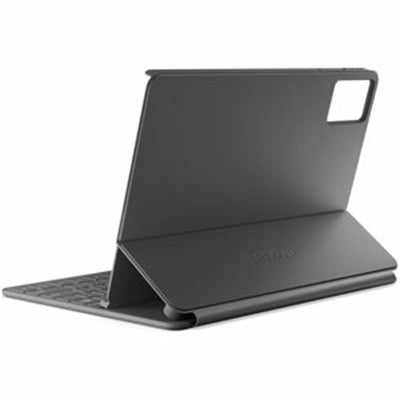
Lenovo Folio Keyboard for IdeaTab
The Lenovo Folio Keyboard for IdeaTab is a premium all-in-one typing and protection solution designed specifically for Lenovo IdeaTab tablets. This pogo-pin keyboard combines a responsive keyboard with a protective folio case, delivering seamless productivity without the complexity of wireless pairing or charging. Whether you're working on documents, emails, or creative projects, this integrated tablet keyboard and case solution keeps your device secure while providing instant typing capability.
Featuring a built-in stand and integrated pen holder, the Lenovo Folio Keyboard transforms your tablet into a complete workstation. The 3-pin pogo connector ensures reliable, instant connection every time you need it—perfect for professionals, students, and mobile workers who demand efficiency and protection in one compact package.
Key Features
- Pogo-pin keyboard connection with instant activation—no pairing or charging required
- All-in-one protective folio case design for complete around-device protection
- Built-in stand for comfortable viewing and typing angles
- Integrated pen holder keeps your Lenovo Tab Pen secure and accessible
- Responsive keyboard for professional-grade typing experience
- Seamless integration with IdeaTab tablets for optimized compatibility
- Lightweight and portable design for mobile productivity
Technical Specifications
| Specification |
Details |
| Product Name |
Lenovo Folio Keyboard for IdeaTab |
| Part Number |
ZG38C07087 |
| Connection Type |
3-Pin Pogo Connector |
| Case Type |
Protective Folio Case |
| Stand |
Built-in Adjustable Stand |
| Pen Storage |
Integrated Pen Holder |
| Power Requirements |
None—Pogo-pin powered |
| Compatibility |
Lenovo IdeaTab Tablets |
Frequently Asked Questions
What is a pogo-pin keyboard and how does it work?
A pogo-pin keyboard uses spring-loaded metal pins to connect directly to your tablet without wireless pairing. The Lenovo Folio Keyboard's 3-pin pogo connector provides instant, reliable connection the moment you attach the keyboard to your IdeaTab—no setup, no charging, just immediate productivity.
Does the Lenovo Folio Keyboard require charging?
No. The pogo-pin connection powers the keyboard directly from your IdeaTab tablet, eliminating the need for separate charging or battery management. This makes it ideal for users who want a hassle-free typing solution.
Can I use the built-in stand with different viewing angles?
Yes. The built-in stand is designed to provide comfortable viewing and typing angles for various tasks—from document editing to media consumption. The folio design supports multiple positions for optimal productivity.
Is the pen holder compatible with all styluses?
The integrated pen holder is specifically designed for the Lenovo Tab Pen, ensuring a secure fit and easy access. This keeps your stylus protected and always within reach when you need it.