
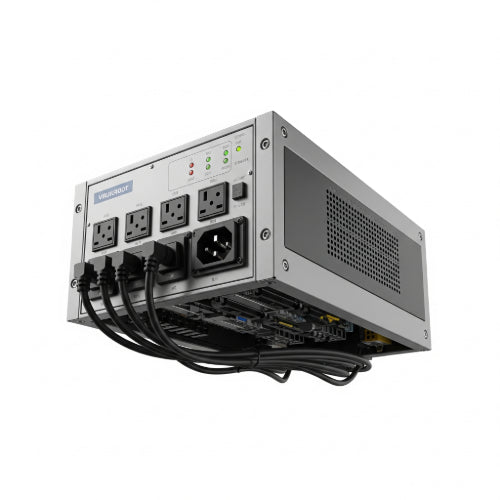
What You Need to Know Before Buying a PDU
In the dynamic world of IT infrastructure, a seemingly simple component often goes overlooked until a power crisis hits: the Power Distribution Unit, or PDU. More than just a fancy power strip, a well-chosen PDU is the backbone of efficient and reliable power delivery to your critical equipment. But with a dizzying array of options, how do you choose the right one?
Here's what you absolutely need to know before you invest in a PDU:
1. The Core Purpose: More Than Just Outlets
Think of a PDU as the intermediary between your power source (UPS, generator, or wall outlet) and your IT equipment (servers, switches, storage arrays). Its primary functions include:
- Distributing Power: Providing multiple outlets to power various devices.
- Organizing Cables: Helping to manage the spaghetti of power cords in your rack.
- Protecting Equipment (Basic): Some PDUs offer basic surge protection, though this shouldn't be your primary defense.
- Monitoring & Management (Advanced): This is where modern PDUs truly shine, offering insights into power consumption, environmental conditions, and remote control.
2. Types of PDUs: Not All Are Created Equal
The first step in your PDU journey is understanding the different types:
- Basic PDUs: These are essentially glorified power strips for your rack. They offer multiple outlets but no monitoring or management capabilities. Ideal for small, non-critical setups or where budget is the absolute priority.
- Metered PDUs: These provide local digital displays that show the aggregate power consumption of the PDU. This is crucial for capacity planning and ensuring you don't overload circuits.
- Monitored PDUs: Taking it a step further, monitored PDUs offer remote monitoring of power usage (current, voltage, power factor) at the PDU level, often via a network interface. This allows for proactive management and alerts.
- Switched PDUs: These are the most advanced. In addition to monitoring, switched PDUs allow for individual outlet control. You can remotely power cycle or switch off specific outlets, which is invaluable for remote reboots of locked-up servers or for conserving power to non-essential devices.
- Automatic Transfer Switch (ATS) PDUs: While not a PDU in the traditional sense, ATS PDUs are often integrated with rack power solutions. They provide redundancy by automatically switching to an alternate power source if the primary source fails, ensuring continuous uptime for single-corded devices.
3. Capacity is King: Amperage and Voltage
This is where the rubber meets the road. Incorrectly sizing your PDU can lead to tripped breakers, downtime, and even equipment damage.
- Amperage (A): Determine the total current draw of all the devices you plan to connect to the PDU. Always factor in future expansion and add a safety margin (e.g., 20-30% buffer). PDUs come in various amperage ratings (e.g., 15A, 20A, 30A, 50A).
- Voltage (V): Ensure the PDU's voltage matches the input voltage of your equipment and your power source (e.g., 120V, 208V, 230V). Mixing and matching can be disastrous.
- Phases (Single-phase vs. Three-phase): For higher power density environments, you might encounter three-phase power. Ensure your PDU is compatible with your building's power infrastructure.
4. Outlet Types and Quantity: Don't Get Caught Short
- Outlet Quantity: Count the number of devices you need to power, and then add extra outlets for future growth. It's always better to have too many than too few.
- Outlet Types: Different regions and equipment use different plug types (e.g., NEMA 5-15R, C13, C19). Make sure the PDU has the correct receptacle types to match your equipment's power cords. Universal PDUs with a mix of outlet types can be very useful.
5. Form Factor: Horizontal or Vertical?
PDUs come in different physical configurations:
- Horizontal PDUs (1U/2U): These mount horizontally in your rack, occupying 1 or 2 units of rack space. They are good for smaller racks or when you have limited vertical space.
- Vertical PDUs (0U): These mount vertically along the side of your rack, taking up no "U" space. This is ideal for maximizing rack space for IT equipment and often allows for more outlets.
6. Environmental Monitoring: Beyond Power
Advanced PDUs can offer more than just power metrics. Look for features like:
- Temperature and Humidity Sensors: Crucial for maintaining optimal operating conditions in your server room and preventing overheating.
- Contact Closures: Allowing you to connect external sensors (e.g., door open, smoke detectors) for a more comprehensive environmental overview.
7. Network Connectivity and Management: The Smart PDU Advantage
For anything beyond a basic setup, network connectivity is paramount:
- Ethernet Port: Allows for remote monitoring and management via a web interface, SNMP, or command-line interface.
- SNMP Support: Integrates with network management systems for centralized monitoring and alerts.
- Remote Outlet Control: The ability to power cycle individual outlets remotely is a game-changer for troubleshooting and managing remote sites.
- User Management and Security: Ensure the PDU has robust security features to prevent unauthorized access.
8. Budget and Future-Proofing
While basic PDUs are relatively inexpensive, advanced features come with a higher price tag. Consider your current needs and future growth plans. Investing in a more capable PDU now can save you headaches and expenses down the line. Think about:
- Scalability: Can the PDU support your planned expansion?
- Integration: Will it seamlessly integrate with your existing infrastructure monitoring tools?
- Vendor Support: Choose a reputable vendor with good technical support and warranty.
The Bottom Line
Buying a PDU isn't just about getting power to your devices; it's about optimizing your power infrastructure, improving reliability, and gaining valuable insights into your data center's operations. By carefully considering these factors, you can select the PDU that not only meets your current needs but also positions your infrastructure for future success. Don't underestimate the power of a well-chosen PDU – it's a critical component in ensuring your IT operations run smoothly and efficiently.





