
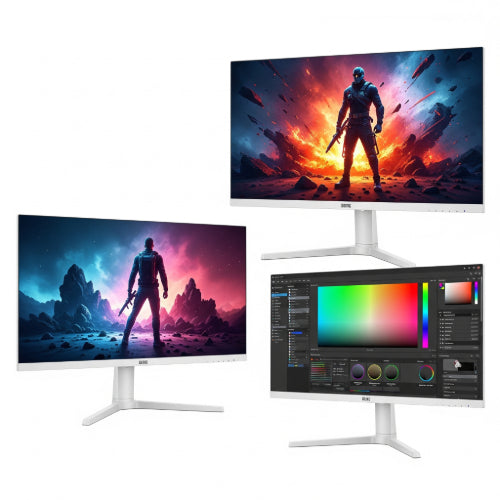
Pixel Perfect Worlds vs. Productive Powerhouses: Choosing the Right Monitor
Whether you're conquering virtual battlegrounds or tackling complex projects, your monitor is your window to the digital world. But a monitor optimized for lightning-fast reflexes in competitive gaming might leave you frustrated when color-grading photos or poring over spreadsheets. Choosing the right display requires understanding the key differences between what makes a monitor great for gaming versus professional work.
So, ditch the generic displays and let's dive into what you should be looking for, whether you're a hardcore gamer or a graphic designer working from a home office.
Gaming Monitors: The Need for Speed and Smoothness
For gamers, the primary focus is on responsiveness and visual fluidity. Every millisecond counts, and screen tearing or stuttering can mean the difference between victory and defeat.
Key Features to Look For:
-
High Refresh Rate: Measured in Hertz (Hz), the refresh rate indicates how many times per second the monitor updates the image. For gaming, aim for at least 144Hz. Higher refresh rates like 240Hz or even 360Hz offer a significantly smoother and more responsive experience, especially in fast-paced games.
-
Low Response Time: Measured in milliseconds (ms), response time refers to how quickly a pixel can change color. A low response time (ideally 1ms or less) minimizes motion blur and ghosting, crucial for tracking fast-moving objects.
-
Adaptive Sync Technology (FreeSync or G-Sync): These technologies synchronize the monitor's refresh rate with your graphics card's frame rate, eliminating screen tearing and reducing stuttering for a smoother, more immersive gaming experience. Check if your monitor is compatible with your GPU (AMD for FreeSync, NVIDIA for G-Sync, though many monitors now support both).
-
Panel Type (TN, VA, IPS):
-
TN (Twisted Nematic): Generally offer the fastest response times and highest refresh rates, making them popular for competitive gaming. However, they often have narrower viewing angles and less vibrant color accuracy compared to other panel types.
-
VA (Vertical Alignment): Provide excellent contrast ratios and decent color accuracy with generally good response times (though sometimes slightly slower than TN). They can suffer from black smearing in some instances.
-
IPS (In-Plane Switching): Offer the best color accuracy and wide viewing angles, making them great for visually rich games. Response times have improved significantly in recent IPS gaming panels, often rivaling VA.
-
-
Resolution: While 1080p (Full HD) can suffice for high refresh rates on a budget, 1440p (QHD) offers a sharper image with more detail, provided your graphics card can handle it. 4K gaming is becoming more accessible but requires powerful hardware to maintain high frame rates.
-
Size: The ideal size depends on your viewing distance and personal preference. Common gaming monitor sizes range from 24 to 32 inches.
Professional Work Monitors: Accuracy, Detail, and Comfort
For professionals who rely on visual accuracy and extended screen time, the priorities shift towards color fidelity, resolution, and ergonomics.
Key Features to Look For:
-
High Resolution: More pixels mean more detail and screen real estate, crucial for tasks like video editing, graphic design, CAD, and working with large datasets. Aim for at least 1440p (QHD), with 4K (UHD) being ideal for detail-oriented work.
-
Excellent Color Accuracy and Coverage: Professionals in creative fields (photography, videography, graphic design) need monitors that can accurately reproduce a wide range of colors. Look for monitors that cover a high percentage of color gamuts like sRGB (for web content), Adobe RGB (for print), or DCI-P3 (for video). Delta-E values (lower is better) indicate color accuracy out of the box.
-
Panel Type (IPS Preferred): IPS panels are generally favored for professional work due to their superior color accuracy and wide viewing angles, ensuring consistent colors even when viewed from off-center.
-
Good Contrast Ratio: A higher contrast ratio (the difference between the brightest white and the darkest black) provides better detail and depth in images and videos.
-
Ergonomics: Since professionals often spend long hours in front of their monitors, adjustability is crucial. Look for stands that offer tilt, swivel, pivot, and height adjustments to find the most comfortable viewing position, reducing strain and fatigue.
-
Screen Size and Aspect Ratio: Larger screen sizes (27 inches and above) and ultrawide aspect ratios can significantly enhance productivity by allowing you to have multiple applications open side-by-side.
-
Connectivity: Consider the ports you need, such as HDMI, DisplayPort, USB-C (with DisplayPort Alt Mode and Power Delivery can be particularly useful for connecting laptops), and USB hubs for peripherals.
Can One Monitor Do Both?
While there's no perfect "one-size-fits-all" solution, some high-end monitors are designed to bridge the gap. These often feature:
-
High Refresh Rates (144Hz or higher)
-
Low Response Times (4ms or lower)
-
Excellent Color Accuracy (covering a wide color gamut with low Delta-E)
-
Adaptive Sync Technology
-
High Resolution (1440p or 4K)
However, these "hybrid" monitors often come with a premium price tag. You might also have to make slight compromises. For example, a monitor with exceptional color accuracy might have a slightly higher response time than a dedicated TN gaming panel.
Making the Right Choice
When you're Browse for a new monitor, consider these key takeaways:
-
For Gaming: Prioritize refresh rate, response time, and adaptive sync. Panel type is secondary but consider the trade-offs between speed and color.
-
For Professional Work: Prioritize resolution, color accuracy, color gamut coverage, and ergonomics. IPS panels are generally the best choice.
Think about your primary use case. If gaming is your passion and professional work is secondary, lean towards a gaming monitor. If color accuracy and detail are paramount for your livelihood, a professional monitor should be your focus. If your budget allows and you desire versatility, explore the high-end hybrid options.
Ultimately, the best monitor is the one that best suits your individual needs and enhances your digital experience, whether you're strategizing your next move in an online game or meticulously crafting your latest design masterpiece. Happy viewing!





