
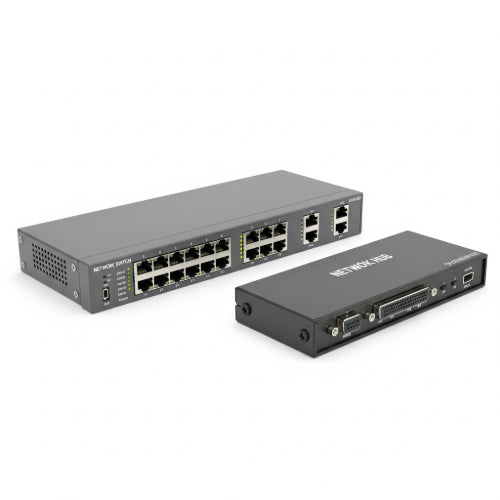
Network Switch vs. Hub: Which is Best for Your Office Network?
When setting up or upgrading your office network, you'll inevitably encounter devices like network switches and hubs. Both are designed to connect multiple computers and other network devices within a Local Area Network (LAN). However, despite their similar appearance and basic function, they operate very differently, and choosing the wrong one can significantly impact your network's performance and efficiency.
Let's dive into the core distinctions between network switches and hubs to help you determine which is the best fit for your office.
Understanding the Basics
Network Hub: A network hub is a very basic networking device that connects multiple Ethernet devices together, making them act as a single network segment. When a hub receives a data packet from one connected device, it simply broadcasts (sends) that packet to all other connected devices on the network. Think of it as a shouting match where everyone hears everything, regardless of whether it's for them.
Network Switch: A network switch is a more intelligent networking device that also connects multiple Ethernet devices. However, unlike a hub, a switch learns the Media Access Control (MAC) addresses of the devices connected to each of its ports. When it receives a data packet, it examines the destination MAC address and forwards the packet only to the specific port where the intended recipient is located. This is more like a private conversation between two specific people.
Key Differences and Their Impact on Your Office Network
The operational differences between hubs and switches have significant implications for network performance, security, and scalability.
1. Data Transmission Method:
- Hub: Uses broadcasting. Data is sent to all ports, and the intended recipient accepts it while others discard it. This creates a lot of unnecessary traffic on the network.
- Switch: Uses unicasting (primarily) and also multicasting or broadcasting when necessary. It directs data only to the intended recipient, significantly reducing unnecessary network traffic.
2. Collision Domains:
- Hub: All devices connected to a hub share a single collision domain. This means if two devices try to send data simultaneously, a collision occurs, requiring both devices to retransmit. This severely limits network performance, especially as more devices are added.
- Switch: Each port on a switch typically represents its own collision domain. This virtually eliminates collisions, as multiple devices can send and receive data simultaneously without interference.
3. Bandwidth Allocation:
- Hub: All devices connected to a hub share the total bandwidth of the hub. If you have a 100 Mbps hub and multiple devices are actively sending data, that 100 Mbps is divided among them.
- Switch: Each port on a switch typically provides dedicated bandwidth to the connected device. A 100 Mbps switch port will provide 100 Mbps to the connected computer, even if other devices are also utilizing their dedicated 100 Mbps ports. This ensures much better performance under heavy load.
4. Intelligence and Learning:
- Hub: "Dumb" device. It doesn't learn anything about the devices connected to it.
- Switch: "Intelligent" device. It builds and maintains a MAC address table (CAM table) to know which device is connected to which port. This intelligence is what allows it to direct traffic efficiently.
5. Speed and Performance:
- Hub: Very slow and inefficient, especially in busy networks. Collisions and shared bandwidth lead to significant bottlenecks.
- Switch: Much faster and more efficient, providing dedicated bandwidth and virtually eliminating collisions. This results in significantly better network performance, faster file transfers, and smoother application usage.
6. Security:
- Hub: Offers almost no security. Because data is broadcast to all ports, it's easier for malicious actors to "sniff" or intercept network traffic intended for other devices.
- Switch: Provides a basic level of security by directing traffic only to the intended recipient. More advanced "managed switches" offer security features like VLANs (Virtual LANs) to segment networks, port security to limit devices, and access control lists (ACLs).
7. Cost:
- Hub: Generally very inexpensive.
- Switch: More expensive than hubs, but the price difference has narrowed significantly over the years, making switches very affordable even for small offices. Managed switches with advanced features are more costly than unmanaged ones.
Which is Best for Your Office Network?
The answer is overwhelmingly clear in almost all modern office scenarios:
Choose a Network Switch if:
- You want optimal network performance and speed. This is crucial for fast file transfers, smooth video conferencing, and responsive cloud applications.
- You have more than a few devices (e.g., computers, printers, servers, IP phones) that need to communicate reliably.
- You need better network security. Even basic switches offer an improvement over hubs, and managed switches provide powerful security features.
- You are setting up any new office network.
- You need to segment your network using VLANs (with a managed switch).
When would you ever choose a Network Hub? Honestly, in a modern office environment, there's virtually no practical reason to choose a network hub over a switch. They are largely obsolete for active data networks due to their severe performance limitations and lack of security. Their only remaining use might be in very specific, niche troubleshooting scenarios or extremely simple, temporary, and non-performance-critical setups where cost is the absolute singular factor.
Conclusion
While network hubs were once common, they are now relics of an earlier networking era. For any office, regardless of size, a network switch is the unequivocally superior choice. Its intelligent operation, dedicated bandwidth, and collision-free environment provide the speed, efficiency, and fundamental security necessary for a productive and reliable business network. Investing a little more in a switch will pay dividends in network performance and save you from frustrating bottlenecks and potential security vulnerabilities.





