
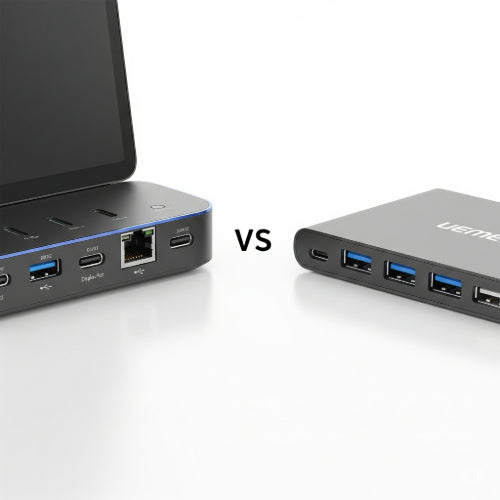
Laptop Docking Stations vs USB Hubs: Which Is Better for Your Workspace?
In today's increasingly mobile world, laptops are the go-to for many professionals and students. But while their portability is a huge advantage, the limited number of ports can quickly become a bottleneck, especially when you're trying to set up a productive workstation. That's where laptop docking stations and USB hubs come in. Both aim to expand your connectivity, but they do so in different ways and cater to different needs.
So, which one is right for you? Let's break it down.
Understanding the Basics
USB Hubs: Think of a USB hub as a splitter for your USB port. You plug the hub into one of your laptop's USB ports, and it then provides multiple USB ports for you to connect peripherals like a mouse, keyboard, external hard drive, or flash drive. They are generally compact, portable, and relatively inexpensive.
Laptop Docking Stations: A docking station is a more comprehensive solution. While it also expands your USB connectivity, it typically offers a wider array of ports, including video outputs (HDMI, DisplayPort, DVI), Ethernet, audio jacks, and often even power delivery to charge your laptop. Docking stations are designed to transform your laptop into a full-fledged desktop experience with a single connection.
Key Differences to Consider
Here's a deeper dive into the factors that differentiate these two connectivity solutions:
1. Connectivity & Port Variety:
- USB Hubs: Primarily focused on expanding USB ports (USB-A and sometimes USB-C). Some may include an SD card reader, but video output is rare and often limited.
- Docking Stations: Offer a much broader range of ports, including multiple video outputs for dual or even triple monitor setups, Gigabit Ethernet for stable wired internet, dedicated audio jacks, and a more robust selection of USB ports.
2. Power Delivery:
- USB Hubs: Most basic USB hubs are unpowered and draw power directly from your laptop. This can sometimes lead to instability with power-hungry devices. Powered USB hubs exist, but they still typically require a separate power adapter.
- Docking Stations: Many modern docking stations offer power delivery (PD) through a single USB-C cable. This means you can charge your laptop, connect all your peripherals, and drive your external displays with just one connection to your laptop, significantly reducing cable clutter.
3. External Monitor Support:
- USB Hubs: While some advanced USB-C hubs might offer a single HDMI or DisplayPort output, their multi-monitor support is often limited or requires specific DisplayLink drivers, which can sometimes impact performance.
- Docking Stations: This is where docking stations truly shine. They are designed for seamless multi-monitor setups, often supporting resolutions up to 4K or even 5K across multiple displays, making them ideal for graphic designers, video editors, or anyone who benefits from extended screen real estate.
4. Performance & Bandwidth:
- USB Hubs: All devices connected to a single USB hub share the bandwidth of that single laptop port. If you're running many high-bandwidth devices (e.g., multiple external hard drives), you might experience slowdowns.
- Docking Stations: High-quality docking stations often utilize technologies like Thunderbolt or advanced USB-C implementations to provide dedicated bandwidth for different port types, ensuring smoother performance across all connected devices, especially for video and data transfer.
5. Convenience & Cable Management:
- USB Hubs: Simple and portable, they are great for adding a few extra ports on the go.
- Docking Stations: Offer unparalleled convenience for a fixed desk setup. With one cable connecting to your laptop, you can instantly access all your peripherals, monitors, and network. This drastically cleans up your workspace and makes connecting and disconnecting your laptop a breeze.
6. Price:
- USB Hubs: Generally much more affordable, ranging from a few dollars to around $50-$100 for more advanced USB-C hubs.
- Docking Stations: Can be a significant investment, often ranging from $100 to several hundred dollars, depending on the features, brand, and connectivity technology (e.g., Thunderbolt docks are usually pricier).
Which One is Right for You?
The best choice depends on your specific needs and how you use your laptop:
-
Choose a USB Hub if:
- You primarily need a few extra USB ports for basic peripherals (mouse, keyboard, flash drive).
- You travel frequently and need a lightweight, portable solution.
- Your budget is limited.
- You don't require external monitors or wired internet connectivity.
-
Choose a Laptop Docking Station if:
- You regularly use your laptop at a fixed desk setup.
- You need to connect multiple external monitors for an extended desktop.
- You prefer a wired internet connection for stability.
- You want a single-cable solution for power, data, and video.
- You work with power-hungry peripherals or large data transfers.
- You value a clean and organized workspace.
Conclusion
Both USB hubs and laptop docking stations serve the purpose of expanding your laptop's connectivity, but they cater to very different user scenarios. For a simple expansion of USB ports on the go, a USB hub is an excellent and economical choice. However, if you're looking to transform your laptop into a powerful desktop workstation with multiple monitors, wired internet, and streamlined cable management, a laptop docking station is undoubtedly the superior investment. Assess your daily workflow and connectivity demands to make the best decision for your workspace!





