
Graphics Cards vs. Integrated Graphics: What’s Best for Your PC Build?
When planning a new PC build, one of the most crucial decisions you'll face is how your system will handle graphics. This often boils down to a choice between relying on integrated graphics or investing in a dedicated graphics card (GPU). Each option has its distinct advantages and disadvantages, catering to different users and budgets. Understanding the core differences is key to building a PC that perfectly suits your needs.
What are Integrated Graphics (iGPUs)?
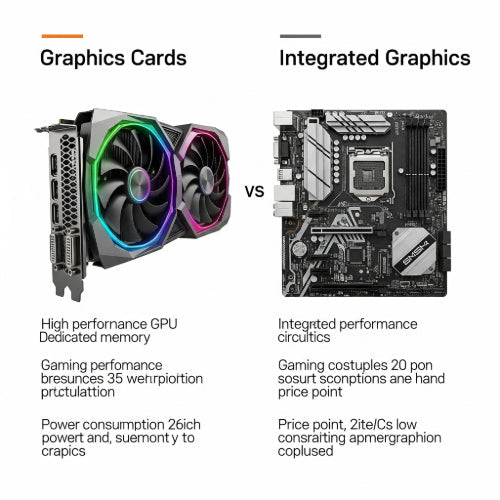
Integrated graphics, or iGPUs, are graphics processing units that are built directly into the computer's main processor (CPU). Instead of having their own dedicated memory, iGPUs share the system's main RAM (Random Access Memory) with the CPU.
Pros of Integrated Graphics:
- Cost-Effective: Since they are part of the CPU, there's no additional cost for a separate graphics component. This makes them ideal for budget-friendly builds.
- Power Efficient: They consume less power and generate less heat compared to dedicated graphics cards, leading to quieter systems and potentially smaller power supplies.
- Compact Builds: Their small footprint allows for slimmer laptops and more compact desktop PCs (like mini PCs) that don't require the space or cooling of a dedicated GPU.
- Simplicity: Fewer components mean simpler builds and fewer potential points of failure.
Cons of Integrated Graphics:
- Lower Performance: Share system RAM and are less powerful, leading to significantly lower performance in graphically intensive tasks.
- Resource Sharing: Competing with the CPU for system RAM can sometimes bottleneck overall system performance.
- Not Upgradeable: You cannot upgrade the iGPU without upgrading the entire CPU.
- Limited Use Cases: Struggle with modern gaming, professional video editing, 3D rendering, or CAD applications.
What are Graphics Cards (Dedicated GPUs)?
A dedicated graphics card is a separate, discrete component that plugs into your motherboard's PCIe slot. It comes with its own dedicated memory (VRAM), a powerful graphics processing unit, and often its own cooling solution.
Pros of Dedicated Graphics Cards:
- Superior Performance: Dramatically outperform iGPUs in all graphically intensive tasks. Essential for smooth gaming at higher resolutions/settings, fast video rendering, and complex 3D modeling.
- Dedicated Memory (VRAM): Having its own high-speed memory ensures that the graphics processing doesn't compete with the CPU for system RAM, avoiding bottlenecks.
- Upgradeability: Can be upgraded independently of the CPU, allowing you to boost graphics performance without overhauling your entire system.
- Advanced Features: Support advanced technologies like real-time ray tracing, DLSS (Deep Learning Super Sampling), and hardware acceleration for professional applications.
Cons of Dedicated Graphics Cards:
- Higher Cost: A significant investment, often the most expensive component in a gaming or professional PC build.
- Higher Power Consumption: Require more power, potentially necessitating a larger and more expensive power supply unit (PSU).
- Heat Generation: Generate substantial heat, requiring robust cooling solutions (larger cases, more fans).
- Larger Form Factor: Generally larger and heavier, limiting their use in ultra-compact PC cases.
Key Differences at a Glance:
Which is Best for Your PC Build?
The choice between integrated and dedicated graphics boils down to your primary use case and budget:
Choose Integrated Graphics if:
- Your Budget is Tight: You're building a very affordable PC for basic tasks.
- You're a Casual User: For web Browse, email, word processing, streaming videos (Netflix, YouTube), and light 2D games.
- You Need a Compact PC: For HTPCs (Home Theater PCs) or small form factor office PCs where space is limited.
- You Prioritize Energy Efficiency/Quiet Operation: For systems that need to run silently with minimal power draw.
Choose a Dedicated Graphics Card if:
- You're a Gamer: For playing modern video games at decent frame rates, higher resolutions, and better graphical settings.
- You're a Creative Professional: For video editing, 3D modeling, graphic design, animation, or CAD work that benefits from GPU acceleration.
- You Work with AI/Machine Learning: These tasks heavily rely on powerful GPU compute capabilities.
- You Demand High Performance: For any application where smooth visuals and quick processing of graphical data are critical.
- You Plan for Future Upgrades: You want the flexibility to upgrade your graphics performance down the line.
Conclusion
For basic computing needs and budget-conscious builds, integrated graphics offer excellent value and sufficient performance. However, if your aspirations include modern gaming, professional creative work, or anything that demands serious graphical horsepower, a dedicated graphics card is an absolute necessity. Evaluate your specific needs, assess your budget, and choose the graphics solution that will best empower your PC to do what you want it to do.





