
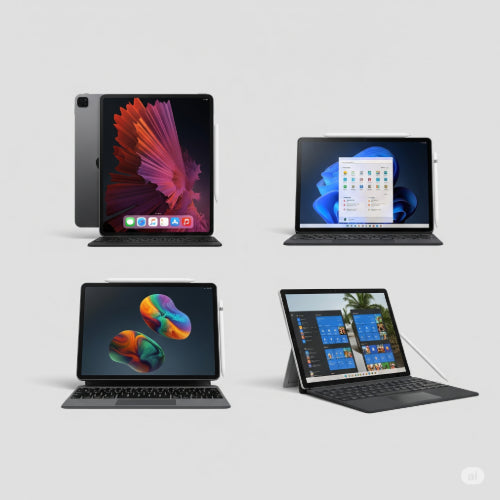
The Best Tablets for Business Professionals: A Buying Guide
In today's dynamic business landscape, the lines between work and personal life are increasingly blurred, and the tools we use need to adapt. For business professionals, the tablet has emerged as a powerful companion, bridging the gap between the portability of a smartphone and the full functionality of a laptop. From client presentations to on-the-go productivity, a well-chosen tablet can significantly enhance efficiency and flexibility.
But with a myriad of options on the market, how do you choose the best tablet to suit your business needs? This buying guide will walk you through the key considerations and highlight some of the top contenders.
Why a Tablet for Business?
Before we dive into the specifics, let's quickly re-emphasize why a tablet can be a game-changer for professionals:
- Portability: Lighter and thinner than most laptops, tablets are ideal for travel, meetings, and working remotely.
- Versatility: With the right accessories (like a keyboard and stylus), a tablet can transform from a consumption device to a creation powerhouse.
- Instant On: Unlike laptops that require boot-up time, tablets are ready to go at a moment's notice.
- Intuitive Interface: Touchscreens make navigation quick and natural, especially for presentations and collaborative work.
- Long Battery Life: Many tablets offer impressive battery life, allowing you to work for extended periods without needing a power outlet.
Key Considerations When Buying a Business Tablet
To make an informed decision, consider these crucial factors:
1. Operating System (OS)
Your choice of OS will heavily influence the apps you can use and the overall user experience.
- iPadOS (Apple iPads): Known for its robust app ecosystem, excellent security, and powerful performance. Ideal for creative professionals and those already invested in the Apple ecosystem.
- Windows (Microsoft Surface, etc.): Offers the full desktop Windows experience, meaning compatibility with all your existing Windows software. Best for users who need full laptop functionality in a tablet form factor.
- Android (Samsung Galaxy Tab, Lenovo, etc.): Highly customizable, with a vast array of apps and generally more affordable options. Great for general productivity, media consumption, and specific Android-based business apps.
2. Performance (Processor & RAM)
Don't skimp on power. For business use, you'll want a tablet that can handle multitasking, demanding applications, and quick responsiveness.
- Processor: Look for modern, powerful processors like Apple's A-series or M-series chips, Intel Core i5/i7 (for Windows tablets), or high-end Snapdragon/Exynos chips (for Android).
- RAM: Aim for at least 8GB of RAM for smooth multitasking. If you're running complex software or editing large files, 16GB or more is advisable.
3. Storage
Consider how much data, apps, and files you'll need to store locally.
- Internal Storage: 128GB should be considered a minimum. 256GB or 512GB provides more breathing room, especially if you deal with large documents, presentations, or media files.
- Expandable Storage (MicroSD): Some Android tablets offer microSD card slots, which can be a cost-effective way to expand storage. iPads and Windows tablets typically do not.
4. Display Quality
A good display is crucial for presentations, video calls, and comfortable viewing during long work sessions.
- Size: Common sizes range from 10 to 13 inches. Larger screens offer more workspace, while smaller ones are more portable.
- Resolution: Higher resolution (e.g., 2048 x 1536 pixels or higher, often marketed as Retina, AMOLED, or Liquid Retina) provides sharper text and images.
- Brightness & Color Accuracy: Important for outdoor use and for professionals in design or marketing.
5. Battery Life
You don't want your tablet dying in the middle of a crucial meeting. Look for tablets offering at least 8-10 hours of real-world usage.
6. Connectivity
- Wi-Fi: Wi-Fi 6 or 6E for faster, more reliable wireless internet.
- Cellular (LTE/5G): Essential for professionals who need constant internet access on the go, especially when Wi-Fi isn't available.
- Ports: USB-C is becoming standard for charging and connecting accessories. Some tablets might offer Thunderbolt for faster data transfer and external display support.
7. Accessories
Many tablets become truly powerful for business when paired with the right accessories.
- Keyboard Cover: Transforms your tablet into a laptop-like device for typing documents and emails.
- Stylus/Pen: Ideal for note-taking, sketching, annotating documents, and digital signatures.
- Docking Station: For connecting to external monitors, peripherals, and wired networks in an office setting.
Top Contenders for Business Professionals
While the "best" tablet depends on your specific needs, here are some consistently strong performers:
-
Apple iPad Pro (11-inch or 12.9-inch):
- Pros: Industry-leading performance (M-series chips), stunning Liquid Retina XDR display, excellent app ecosystem, seamless integration with Apple Pencil 2 and Magic Keyboard.
- Best for: Creative professionals, designers, executives, anyone needing top-tier performance and a premium experience.
-
Microsoft Surface Pro Series (e.g., Surface Pro 9):
- Pros: Full Windows desktop experience, great for traditional laptop tasks, excellent built-in kickstand, optional Type Cover keyboard and Surface Pen.
- Best for: Professionals who need full software compatibility with Windows apps, those who frequently switch between tablet and laptop modes.
-
Samsung Galaxy Tab S Series (e.g., Galaxy Tab S8 Ultra/S9 Ultra):
- Pros: Beautiful AMOLED displays, often includes S Pen, good multitasking features (DeX mode), competitive pricing, large screen options.
- Best for: Android power users, those who value large, vibrant displays, and individuals looking for a strong tablet at a slightly lower price point than Apple or Microsoft flagships.
-
Lenovo Tab P12 Pro / Tab P11 Pro Gen 2:
- Pros: Strong performance for Android, good display quality, often bundled with a keyboard and stylus, competitive pricing.
- Best for: Value-conscious professionals looking for a capable Android tablet with productivity features.
Conclusion
Choosing the best tablet for your business needs involves carefully weighing your workflow, budget, and desired features. By considering the operating system, performance, storage, display, and accessories, you can select a device that not only fits seamlessly into your professional life but also empowers you to work smarter, not just harder. Invest wisely, and unlock the full potential of mobile productivity.





