
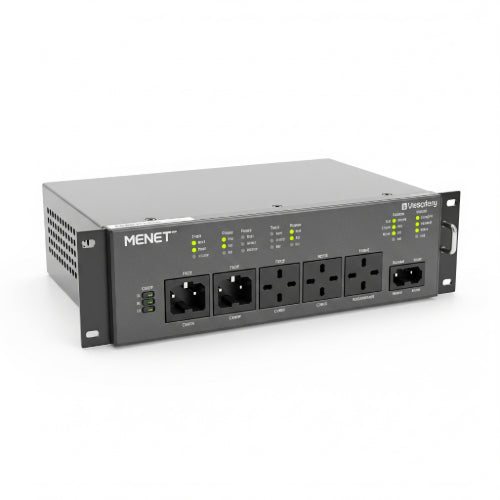
Power Up Your Server Room: A Guide to Installing and Using a PDU
In the heart of every thriving server room, data center, or network closet lies a critical, yet often overlooked, component: the Power Distribution Unit (PDU). While servers, switches, and storage arrays grab all the glory, it's the humble PDU that ensures they receive the consistent, reliable power they need to operate. Without a proper PDU, your meticulously planned IT infrastructure is vulnerable to power fluctuations, outages, and disorganization.
If you're setting up a new server room or looking to optimize an existing one, understanding how to properly install and use a PDU is paramount. Let's dive in!
What is a PDU and Why Do You Need One?
Simply put, a PDU is a device fitted with multiple outlets designed to distribute electric power to computers, servers, and networking equipment within a rack or cabinet. While a standard power strip might seem similar, PDUs are engineered for the demanding environment of a server room, offering features like:
- Higher Amperage Ratings: Capable of handling the significant power draw of multiple high-density devices.
- Specialized Outlets: Often include C13 and C19 outlets, common for server equipment, alongside standard NEMA outlets.
- Robust Construction: Built for continuous operation and often designed for rack mounting.
- Advanced Features: Depending on the type, they can offer remote monitoring, outlet-level control, power metering, and environmental monitoring.
Why are they essential?
- Organization: Eliminate cable spaghetti by providing centralized power distribution within the rack.
- Reliability: Ensure consistent power delivery to all connected devices.
- Safety: Prevent overloading circuits and reduce fire hazards.
- Monitoring & Control (for advanced PDUs): Gain insights into power consumption, identify potential issues, and even remotely power cycle devices.
Types of PDUs: Choosing the Right One for Your Needs
Before installation, it's crucial to select the correct PDU type:
- Basic PDUs: Essentially industrial-grade power strips for racks. They offer multiple outlets and robust construction but no monitoring or control features. Ideal for simple power distribution.
- Metered PDUs: Feature local digital displays that show current draw (amps) for the entire PDU. Great for monitoring overall power consumption and preventing overloads.
- Monitored PDUs: Offer remote monitoring capabilities via network connection (Ethernet). You can view power consumption data, set thresholds, and receive alerts from anywhere.
- Switched PDUs: Provide all the features of a monitored PDU plus the ability to remotely control individual outlets. This allows you to power cycle locked-up servers or equipment without physically being in the server room.
- Smart/Intelligent PDUs: Combine monitoring, switching, and often environmental monitoring (temperature, humidity sensors). They offer the highest level of control and insight.
Key considerations when choosing:
- Input Plug Type & Voltage: Matches your server room's power source (e.g., NEMA 5-15P for 120V, L5-30P, L6-30P, C20 for 208V/240V).
- Output Outlet Types & Quantity: Ensure you have enough of the correct outlets (C13, C19, NEMA 5-15R) for all your equipment.
- Amperage Rating: Must match or exceed the total current draw of all connected devices.
- Form Factor: Vertical (0U) for side mounting in the rack, or horizontal (1U/2U) for mounting within the rack space.
How to Install a PDU in Your Server Room
Safety First! Before you begin, always:
- Turn off the power: Ensure the circuit you're working with is de-energized at the breaker panel.
- Use proper tools: Screwdrivers, cable ties, and potentially a rack wrench.
- Wear appropriate PPE: Safety glasses and non-conductive gloves are recommended.
- Consult a qualified electrician if you are unsure about any wiring or high-voltage connections.
Step-by-Step Installation:
-
Mount the PDU:
- Vertical (0U) PDUs: These are typically mounted on the side rails at the back of your server rack. Align the mounting brackets with the rack's pre-drilled holes and secure them with screws. Ensure it doesn't obstruct airflow or other equipment.
- Horizontal (1U/2U) PDUs: These mount just like any other rack-mounted device, taking up 1U or 2U of rack space. Secure them to the front rack rails using cage nuts and screws. It's often best to install them near the top or bottom of the rack for easier cable management.
-
Connect the PDU Input Power:
- Crucial Step: This is where the PDU receives power from your main power source (e.g., a wall outlet, an uninterruptible power supply (UPS), or a dedicated circuit).
- Carefully plug the PDU's input cord into the appropriate power source. Double-check that the voltage and amperage of the source match the PDU's requirements. If connecting to a UPS, ensure the UPS has sufficient capacity for all connected devices.
- For high-amperage PDUs, this might involve a direct connection to a breaker panel by a qualified electrician.
-
Power On the PDU (Safely):
- Once the input power is connected, you can safely turn on the PDU. Most PDUs have a master power switch.
- Verify that any indicator lights on the PDU are on, indicating it's receiving power.
-
Connect Your Equipment to the PDU:
- Now, connect your servers, switches, and other rack-mounted equipment to the PDU's output outlets.
- Cable Management is Key: Use cable ties, Velcro straps, and cable management arms to keep power cords neat and organized. This not only improves airflow but also makes troubleshooting and maintenance much easier.
- Distribute the Load: If your PDU has multiple circuits or phases, try to distribute the power load evenly across them to prevent overloading any single circuit.
-
Configure Network (for Monitored/Switched PDUs):
- If you have a metered, monitored, or switched PDU, connect its Ethernet port to your network switch.
- Access the PDU's web interface (refer to the manufacturer's manual for the default IP address or setup procedure).
- Configure network settings (IP address, subnet mask, gateway), set up SNMP (Simple Network Management Protocol) for integration with network monitoring systems, and establish user accounts and alert thresholds.
Tips for Effective PDU Use and Management
- Label Everything: Label PDU inputs, outputs, and all connected equipment. This is invaluable for troubleshooting.
- Monitor Power Consumption: Regularly check power usage via your PDU's local display or network interface. This helps you identify potential overloads and plan for future capacity needs.
- Implement Redundancy: For critical systems, consider using dual PDUs powered by separate circuits and UPS units. Connect each server with two power supplies to a different PDU for true A+B redundancy.
- Environmental Monitoring: Utilize integrated or external sensors with your PDU to monitor temperature and humidity within the rack. High temperatures can lead to equipment failure.
- Remote Power Cycling (Switched PDUs): Leverage the ability to remotely power cycle individual outlets. This can save you a trip to the server room to reboot a frozen server.
- Firmware Updates: Keep your intelligent PDU's firmware up to date to benefit from new features, security patches, and bug fixes.
- Documentation: Maintain detailed records of your PDU configurations, power consumption, and equipment connections.
Conclusion
A properly installed and managed PDU is an unsung hero in any server room. It's an investment that pays dividends in terms of reliability, safety, and operational efficiency. By understanding the different types, following safe installation practices, and embracing intelligent management techniques, you can ensure your critical IT infrastructure receives the consistent, clean power it needs to thrive, ultimately contributing to the smooth operation of your entire organization.





