
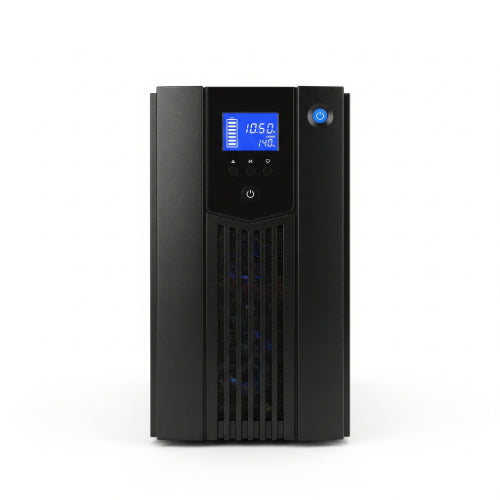
How to Troubleshoot Common Issues with UPS Systems
Uninterruptible Power Supplies (UPS) are unsung heroes of our modern, power-hungry lives. They stand as a silent guardian, protecting our valuable electronics from the unpredictable wrath of power outages, surges, and fluctuations. But like any complex piece of equipment, UPS systems can encounter issues. When your lights flicker or your "on battery" alarm starts blaring, knowing how to troubleshoot common UPS problems can save you a lot of headaches (and potentially lost data!).
Here in Daet, Bicol, where we're no strangers to occasional power interruptions, a reliable UPS is essential. So, let's dive into some common UPS issues and how you can diagnose and fix them.
Before You Begin: Safety First!
Always prioritize safety when working with electrical equipment. Before touching anything inside your UPS or attempting any repairs, ensure the unit is unplugged from the wall and your devices are disconnected. If you're unsure about any step, it's always best to consult a qualified technician.
Common UPS Issues and Their Solutions
1. UPS Not Turning On or No Power Output
This is perhaps the most frustrating issue. If your UPS seems completely dead, here's what to check:
- Check the Power Cord: Sounds obvious, but ensure the power cord is securely plugged into both the wall outlet and the UPS itself.
- Wall Outlet Functionality: Plug another device into the wall outlet to confirm it's providing power. If not, check your circuit breaker.
- UPS On/Off Switch: Make sure the main power switch on the UPS is in the "On" position. Some UPS models have a master power switch and individual outlet switches.
- Internal Circuit Breaker/Fuse: Many UPS units have an internal circuit breaker (often a small button that pops out) or a fuse that can trip due to overload. Press the circuit breaker back in or check the fuse (refer to your UPS manual for fuse location and type).
- Battery Connection: If the UPS is completely new or has been moved, the internal battery might not be properly connected. Open the battery compartment (if accessible) and ensure the battery terminals are firmly attached.
2. UPS Beeping Continuously or Frequently
A beeping UPS is trying to tell you something! The pattern and frequency of beeps often indicate the problem. Consult your UPS manual for specific alarm codes, but generally:
-
On Battery Alarm: This is the most common and usually means the UPS is currently running on battery power due to a power outage or significant voltage fluctuation.
- Solution: Check if the utility power is out. If it is, save your work and safely shut down your connected devices to conserve battery power. The beeping should stop once utility power is restored.
-
Low Battery Alarm: If the beeping persists even when utility power is present, it might indicate a low battery charge.
- Solution: Allow the UPS to charge for several hours without any load connected. If the alarm continues, the battery might be at the end of its lifespan and needs replacement.
-
Overload Alarm: The UPS is beeping because you have too many devices plugged in, exceeding its capacity.
- Solution: Disconnect non-essential devices from the UPS until the alarm stops. Distribute your devices to other outlets if possible.
-
Fault/Error Alarm: This often signifies an internal malfunction.
- Solution: Refer to your UPS manual for the specific error code. It might require a hard reset or professional service.
3. UPS Not Providing Backup Power (Battery Failure)
You lose power, but your devices still shut down. This points directly to a battery issue.
-
Battery Age: UPS batteries have a finite lifespan, typically 3-5 years. If your UPS is older than this, the battery is likely degraded.
- Solution: Replace the battery. Many UPS models have user-replaceable batteries. Refer to your manual for the correct battery type and replacement procedure.
- Battery Connection: As mentioned earlier, ensure the battery is properly connected internally.
-
Deep Discharge: If the UPS has been left unplugged and discharged for an extended period, the battery might be irreversibly damaged.
- Solution: Try charging the UPS for a full 24 hours. If it still fails to hold a charge, battery replacement is necessary.
-
Faulty Charging Circuit: Less common, but the UPS's internal charging circuit could be faulty.
- Solution: This typically requires professional repair or replacement of the UPS unit.
4. UPS Constantly Switching to Battery Mode (Even with Power)
This indicates that the UPS is detecting power irregularities even when you believe the power is stable.
-
Sensitive Mode: Some UPS units have sensitivity settings. If set too high, it might switch to battery mode even for minor fluctuations.
- Solution: Consult your manual to adjust the sensitivity setting to a lower level if available.
-
Poor Quality Incoming Power: The power from your wall outlet might be experiencing frequent sags, surges, or dirty power (noise).
- Solution: Consider using a line conditioner if power quality is a persistent issue in your area.
-
Overloaded Circuit: The circuit your UPS is plugged into might be overloaded, causing voltage drops.
- Solution: Move the UPS to a dedicated circuit if possible, or redistribute the load on the existing circuit.
5. Burning Smell or Smoke
IMMEDIATE ACTION REQUIRED! If you detect a burning smell or see smoke, this is a serious fire hazard.
- Solution: Immediately unplug the UPS from the wall and disconnect all connected devices. Do NOT attempt to use it again. It likely has an internal short circuit or battery failure that requires professional attention or replacement.
When to Call a Professional
While many common UPS issues can be resolved with a bit of troubleshooting, there are times when it's best to call in the experts. If:
- You're uncomfortable working with electrical components.
- The issue persists after trying basic troubleshooting steps.
- Your UPS is emitting smoke or a burning smell.
- The problem involves internal components that are not user-serviceable.
A reliable UPS is an investment in protecting your valuable electronics. By understanding these common issues and knowing how to troubleshoot them, you can extend the life of your UPS and ensure your devices remain powered through thick and thin. Stay safe, and happy troubleshooting!





